Resuming conversations with Claude Code sucks
How I built a tiny shell tool to solve one of my biggest Claude Code frustrations - resuming lost sessions across projects.
The Problem
If you use Claude Code daily, you've probably hit this:
You're working in one project, and you want to jump back into a previous session you've had.
You hit claude and then /resume, scroll through the list, and... it's not there.
That's because /resume only shows sessions from your current working directory.
I found myself constantly cd-ing around trying to remember where I was when I started that conversation.
I ended up just losing a bunch of my old conversations. This problem got even worse every time I closed cmux.
The Solution
cresume is a shell function that scans all your Claude Code sessions across every project directory (scoped inward from your current directory) and lets you pick one with fuzzy search. It then automatically cds to the right directory and resumes the session.
cresume          # sessions from current directory and inward
cresume -a       # sessions from ALL directories
cresume "auth"   # pre-filter with a search term
That's it. One command from your terminal! and you can keep clanking away
How It Works
Claude Code stores session data as .jsonl files under ~/.claude/projects/. Each file contains JSON entries with metadata like:
- the working directory
- session ID
- git branch
- timestamps
- every message in the conversation.
cresume scans these files, extracts the key metadata with jq, and pipes everything into fzf for an interactive selection experience. Each entry shows:
- The first line of your prompt (as a bold title)
- Relative timestamp ("2 hours ago", "just now")
- The project path and git branch
- A preview pane showing your first 5 prompts from that session
When you select a session, it cds to the project directory and runs claude --resume <session-id>.
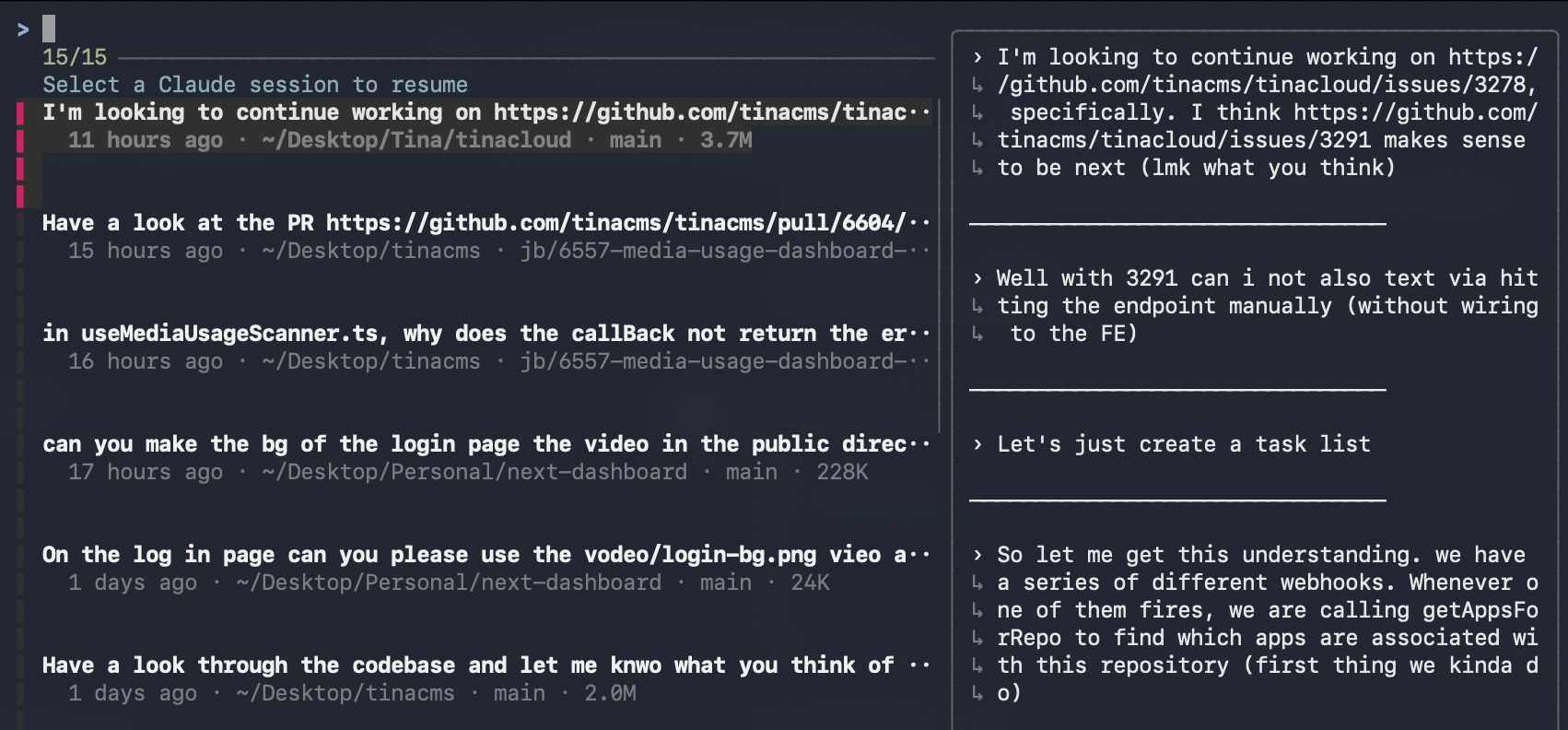
Figure: Cresume Preview
Have the same issue as me?
It's on Homebrew:
brew tap joshbermanssw/cresume
brew install cresume
Then add to your shell config:
[ -f "$(brew --prefix)/share/cresume/cresume.sh" ] && source "$(brew --prefix)/share/cresume/cresume.sh"Or clone it manually:
git clone https://github.com/joshbermanssw/cresume.git ~/.claude/bin/cresume-repoEnd
Scratch your own itch - code has never been cheaper to write (especially when it's just for your own use)
If you use Claude Code, give it a try (and ⭐?). If you have ideas for improvements, PRs are welcome.